
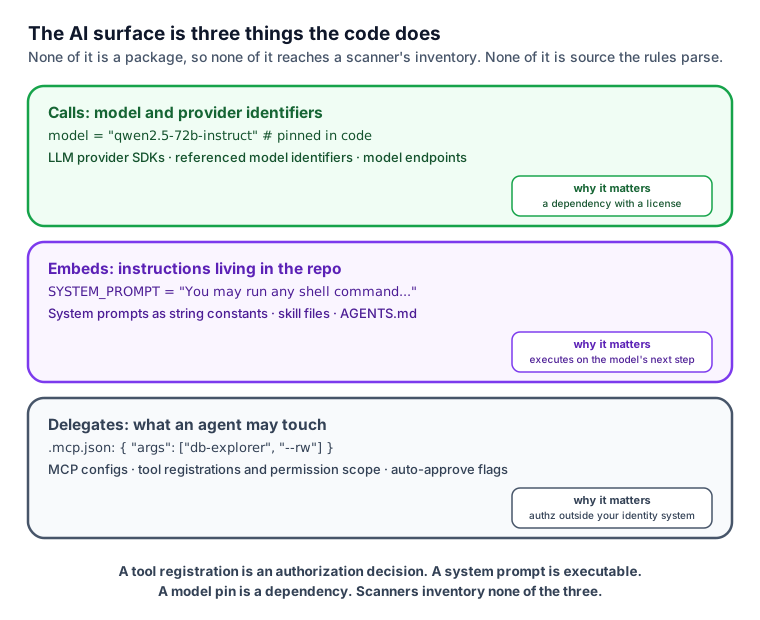
Open a source tree from 2020 and you'd have found source files, package manifests, and maybe a Dockerfile. Open one from this month and you'll also find a .mcp.json describing which external servers an agent may call, an AGENTS.md steering every coding agent that touches the repo, a .claude/ directory, system prompts embedded as string constants, and model names pinned in code. None of these are packages, so none of them appear in a software inventory (SBOM). None of them are the language traditional software scanners parse with various SAST rules, so none of them appear in the list of security findings. They are, mechanically, the most interesting attack surface in the codebase. Just think about it for a moment and you quickly realize that a tool registration with broad permissions is an authorization model living outside your identity system, a system prompt is code that executes on whatever the model does next, and a pinned model name is a dependency with a license and a vendor's terms attached. All of this falls out of the compliance rules many organizations set up, and it does so silently for most of them.
No code scanner inventories any of it. Not the incumbents, not the AI-native tools, and not ZeroQuarry -- until now. Code scans in ZeroQuarry are getting an AI-surface security and compliance review: the inventory of LLM calls/tools/models/infrastructure, prompt injection leads, hallucinated-dependency detection, and a LLM-license export now come out of ZeroQuarry scans.
Inventory everything ("AIBOM")
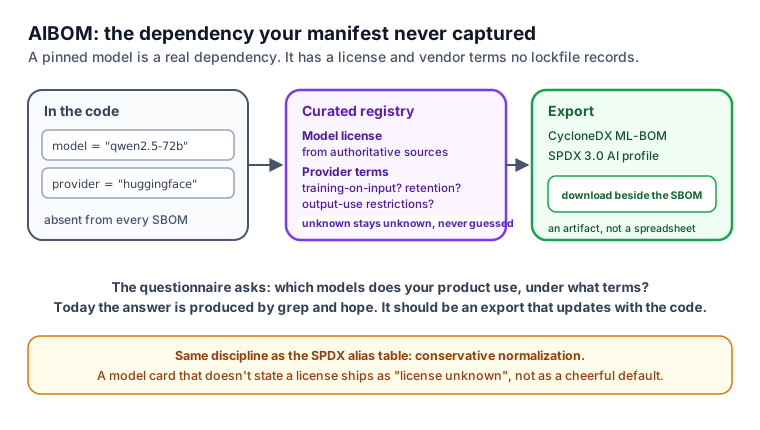
Ask a compliance team what models their product uses and watch what happens: someone greps the code for API keys or asks engineering, and they get back a spreadsheet that's stale by the next merge. Enterprise security questionnaires have started asking for a model inventory explicitly, and there's a reason the answer is hard: a pinned HuggingFace model or a hardcoded provider-model reference is a real dependency, with a license and provider terms (does the provider train on your inputs? what's the retention? what are the output-use restrictions?), and no existing dependency manifest captures it.
The first piece that comes in ZeroQuarry's new AI detection module is an inventory pass that runs at scan time and records agent frameworks and LLM provider SDKs, MCP client and server configurations, skill and agent instruction files, system prompts embedded in code, tool registrations and their permission scope, and referenced model identifiers. The template for this already exists in the product: our infrastructure-as-code (IaC) inventory works the same way. We've built new IaC rules into the product which act like "IaC for the LLM capabilities you build into your products."
Two kinds of cheap hygiene checks come with it: auto-approve style flags in agent configs (the --yolo class, where an agent gets shell access and the config file says not to worry about it), and secrets that sit within reach of agent tooling. While those aren't necessarily vulnerabilities on their own, they're definitely things a reviewer wants flagged.
The standards now exist to make this an export instead of a PDF: CycloneDX has an ML-BOM profile and SPDX 3.0 has an AI profile. ZeroQuarry has now added a curated registry of model licenses and provider terms beside the existing license pipeline (the one that normalizes npm/PyPI/crates licenses into SPDX expressions), and exporting through the existing SBOM machinery. The discipline carries over too: unknown stays unknown, never guessed, the same conservative normalization our SPDX alias table uses.
Hallucinated dependencies ("slopsquatting")
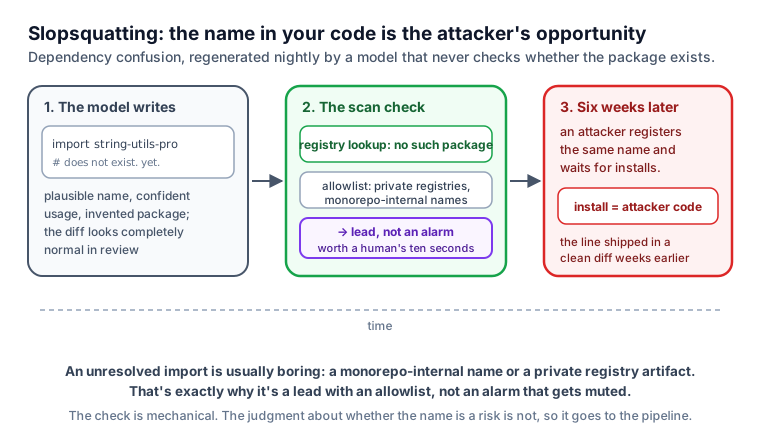
There's a new supply-chain attack emerging: when a coding model suggests an import that doesn't exist and the attacker registers the package. "Slopsquatting" is an emerging threat because even the best LLMs hallucinate package names at an alarming rate (5% or higher at the time of this writing). As part of its inventorying, ZeroQuarry now protects you against this by looking at the dependencies and evaluating them for legitimacy.
Prompt injection doesn't need a chat window
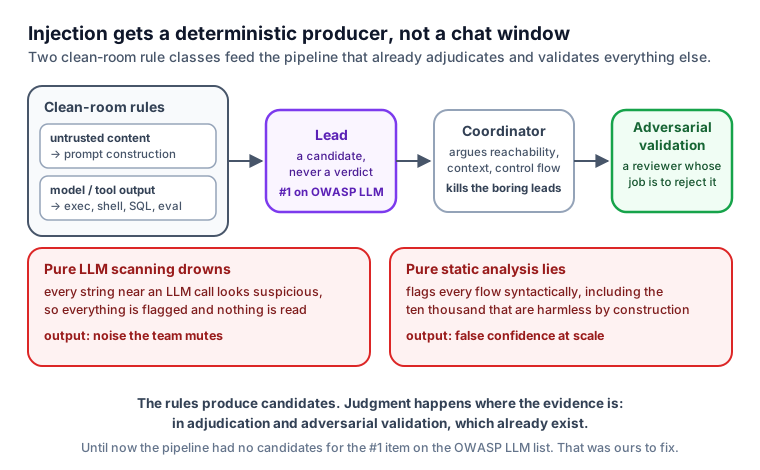
Prompt injection has sat at #1 on the OWASP LLM Top 10 since that list existed, and most of what ships to "scan" for it is a chat window where you paste text and an LLM opines. That approach is horrible because injection is essentially a dataflow question of whether untrusted content reaches prompt construction, and then does the model or tool output reach a dangerous code location? The untrusted content classes are pretty well understood (fetched web pages, file and document loaders, RAG chunks, issue and comment ingestion, third-party tool and MCP outputs)... and the dangerous sinks are the classics: exec, shell, SQL, HTML, eval. But most scanners aren't evaluating how these two bits go together and how they could be exploited.
Pure LLM scanning drowns in the exploit chain and pure static analysis frankly just lies about it (the static tool will happily flag every place a string touches an LLM call, including the ten thousand that are harmless). ZeroQuarry's new AI surface detection works differently though: deterministic rules produce leads, its coordinator agent determines reachability and context, and an adversarial validation agent attempts to find exploits in whatever is actually reachable (I wrote about what that review chain does to scanner noise earlier, in the out-of-band collector post).
This initial release has 2 dedicated built-in prompt injection detection capabilities: untrusted content reaching prompt construction, and model or tool output reaching dangerous sinks.
Shipped on your next scan
One design decision we made when building this: this is a capability of the existing code scan, not a new module, scan type, or SKU. You run a source scan the way you already do and the AI surface inventory, the injection leads, and the hallucinated-dependency checks run inside it. AI findings land in the report tagged so you can filter them and the AIBOM download sits beside the SBOM download. Reports get an AI surface section and a coverage-card addition so "did you scan for what AI introduces?" has an artifact as an answer.
If you maintain an open-source project, you can already scan it for free. If you're evaluating software before deploying it, start a 30-day trial or get in touch.